๐Ÿ“„ Download PDF
๐Ÿ“„ Download PDF
IDEN
Oil Palm Field App ยท Android

XERPIUMSAWIT MOBILE

Attendance, harvest, delivery notes, upkeep and approvals right in the block โ€” works without signal and syncs automatically to XERPIUM SAWIT back on the office Wi-Fi.

100%Works Offline
โ‰ค 3Taps per Ticket
5Field Roles
8Transaction Types
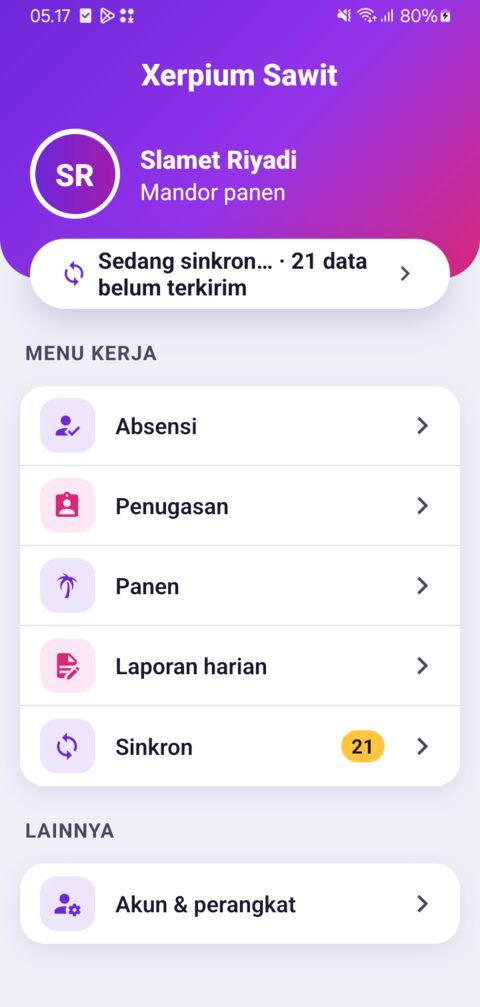
Xerpium Sawit Mobile home screen: harvest foreman work menu and unsent-data indicator

No Signal in the Block โ€” Data Still Has to Be Right

Foremen and clerks spend the whole day in the blocks without coverage. Paper records are slow to consolidate, error-prone, allow duplicate tickets and are hard to verify. XERPIUM SAWIT MOBILE moves recording to an Android phone that keeps working fully in airplane mode.

📡
OFFLINE
All day in the block
🔒
SECURE
Encrypted database
🛡
ANTI-FRAUD
GPS, time, photo
🔄
SYNC
Automatic over Wi-Fi

Built to Be Used Under the Sun

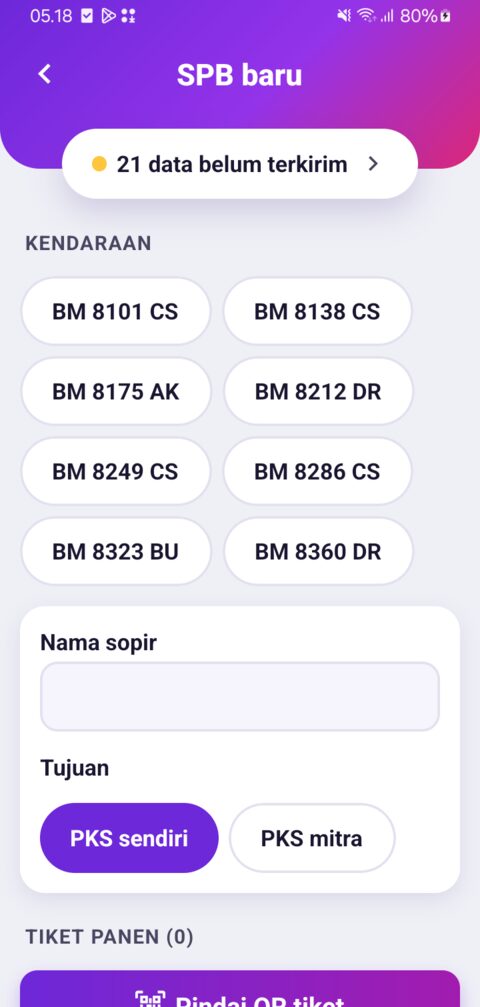
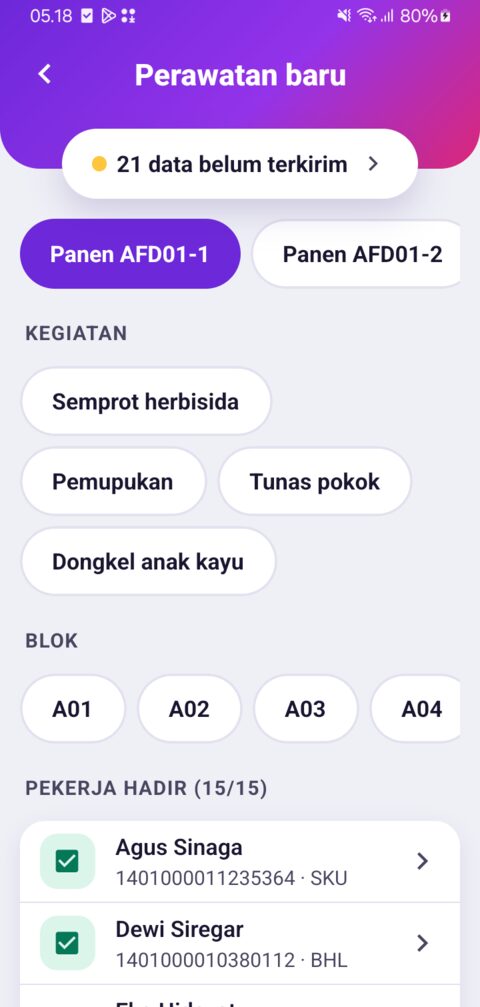
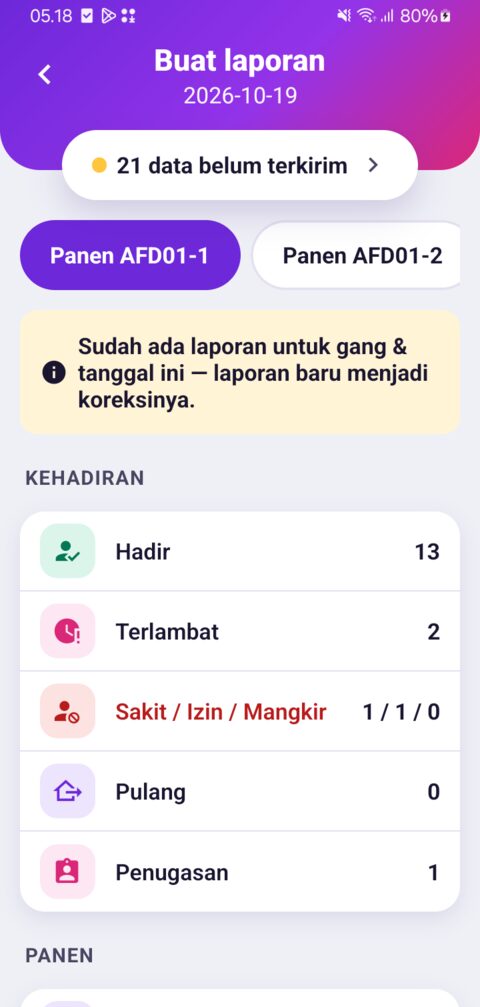
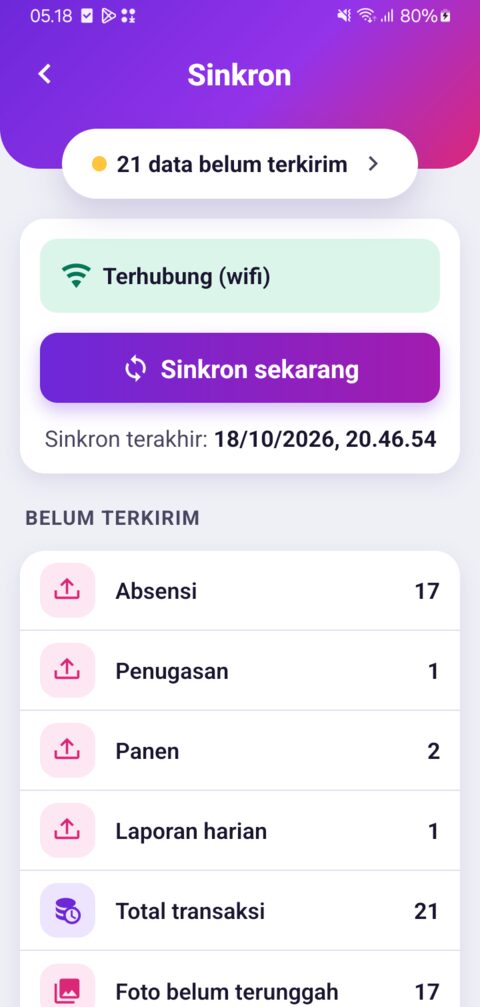
Real screenshots from an Android phone: large buttons, clear type, high contrast and an unsent-data indicator on every screen. The interface is in Bahasa Indonesia.

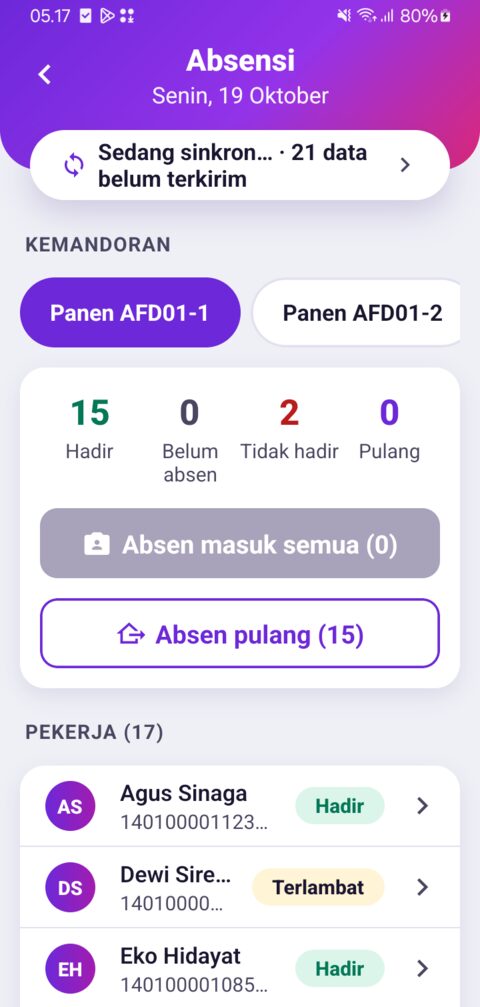
Attendance

Attendance

Daily crew summary, bulk check-in & check-out

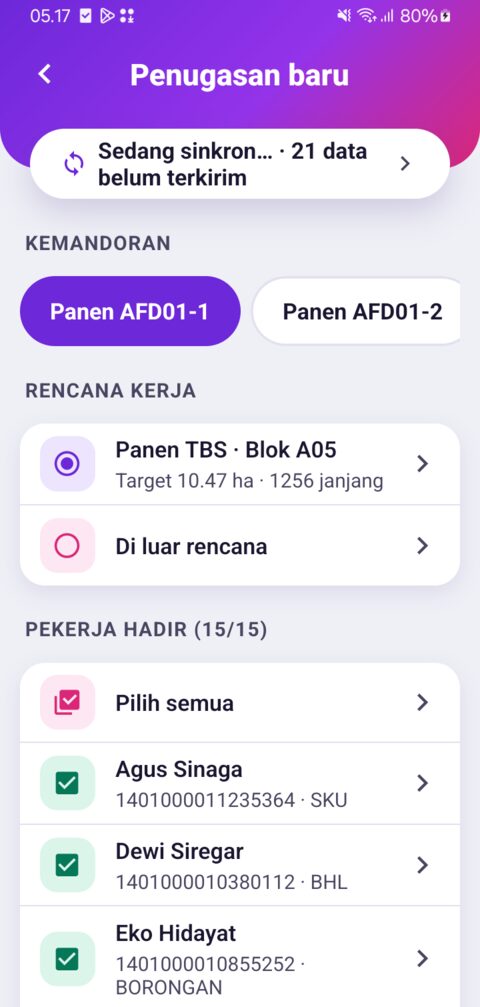
Assignment

Assignment

From the daily work plan, present workers only

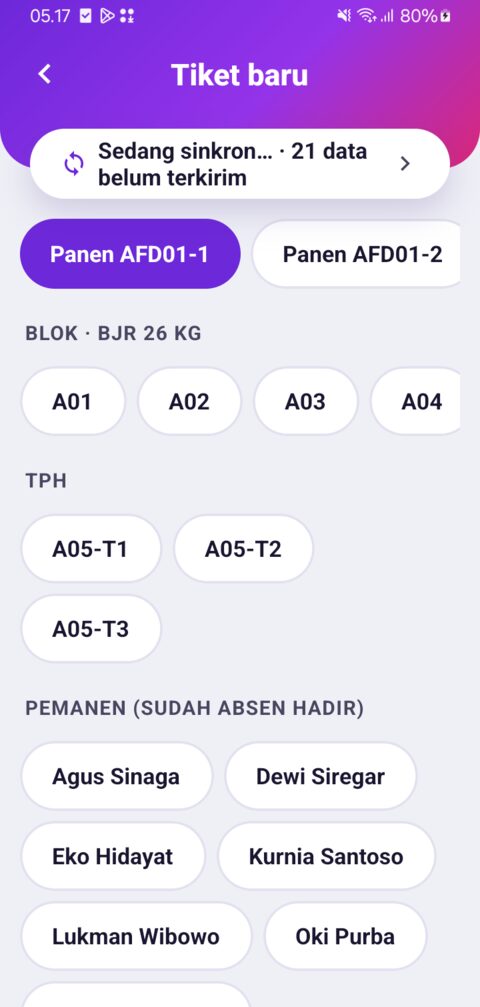
Harvest Ticket

Harvest Ticket

Pick block, collection point and harvester in one tap

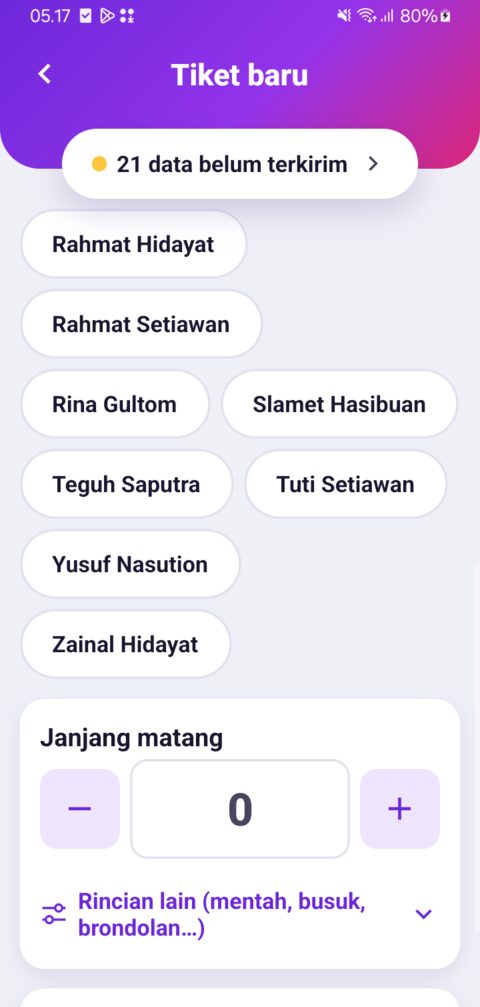
Bunch Count

Bunch Count

Large +/โˆ’ buttons, live kg & premium estimate

Delivery Note

Delivery Note

Vehicle, driver, destination, then scan ticket QR

Upkeep

Upkeep

Activity, block, workers and material dose check

Daily Report

Daily Report

Automatic summary, then on-screen signature

Sync

Sync

Connection status and breakdown of unsent data

One App, Menus by Role

Roles come from the server at login, so every user only sees their own work menus.

RoleMain menus
Harvest ForemanAttendance, assignments, harvest tickets, daily report
Harvest ClerkAttendance, harvest tickets
Upkeep ForemanAttendance, assignments, upkeep & materials, daily report
Transport ClerkDelivery notes (SPB), ticket QR scan, relay transport, SPB printing
Division AssistantApproval of risky items, daily report

All Daily Work in the Block

👥 Attendance & Assignment

  • Bulk check-in โ€” one group photo for the whole crew
  • Status โ€” present, late (reason required), sick, leave, absent, check-out
  • One crew per day โ€” a worker cannot check in to two crews
  • Location check โ€” check-ins outside the division polygon are flagged
  • Assignment โ€” from the daily work plan or unplanned (reason required)
  • NFC card โ€” tap a worker card for fast check-in

🌴 FFB Harvest Ticket

  • โ‰ค 3 taps โ€” pick collection point, harvester, bunch count, save
  • Offline ticket number โ€” unique per phone: DIV-yyMMdd-PHONE-seq
  • Automatic late entry โ€” a second ticket for the same point, harvester and day is flagged
  • Weight estimate โ€” bunches ร— block average bunch weight, shown live
  • Premium estimate โ€” from the activity rate, minus unripe and long-stalk penalties
  • Ticket QR โ€” scanned by the transport clerk, printable

🚚 Transport & Delivery Notes

  • Scan ticket QR โ€” from other foremen's phones, no signal needed
  • Delivery note (SPB) โ€” vehicle, driver, own/partner mill, at least 2 load photos
  • Relay transport โ€” a follow-up SPB carries tickets from its parent SPB
  • One ticket, one SPB โ€” tickets already on another SPB are rejected
  • Potential leftovers โ€” untransported tickets are flagged in the afternoon
  • Printing โ€” 58 mm Bluetooth thermal printer, including QR

🌱 Upkeep & Materials

  • Upkeep work โ€” spraying, fertilizing, pruning: man-days, area (ha) or tree count
  • Live dose check โ€” dose/ha ร— area ร— tolerance
  • Over-dose โ€” note required, goes straight to the assistant's approval queue
  • Wage estimate โ€” per ha, per tree or daily
  • Work photo โ€” from the in-app camera

✅ Assistant Approval

  • Works offline โ€” queue pulled at sync, reviewed in the field
  • Risky items โ€” fake GPS, rooted phone, outside division, over-dose, late entry, uncalibrated time
  • Decisions โ€” approve, request correction or reject (note required)

📝 Daily Report

  • Automatic summary โ€” attendance, assignments, harvest, upkeep per crew
  • On-screen signature โ€” foreman/assistant, stored as evidence
  • Re-submission โ€” recorded as a correction, never overwritten

Field Data You Can Trust

The principle: data is always saved, but every anomaly is flagged and queued for the assistant โ€” no work stops because of missing signal.

🕓

Trusted Time

  • Server time at last sync + the phone's internal clock
  • Changing the phone clock does not affect transaction time
  • Reboot before sync โ†’ transactions are flagged
📍

Location & Fake GPS

  • Coordinates & accuracy on every transaction
  • Mock location detection
  • Inside/outside division polygon check
📷

In-App Camera Only

  • No gallery access
  • Compressed โ‰ค 300 KB, SHA-256 fingerprint
  • Photo hash, time & location cannot be changed
📱

Device Integrity

  • Root, emulator and hooking detection
  • Warning banner on every screen
  • Transactions flagged for the assistant
📝

Append-Only

  • Sent transactions cannot be edited
  • Correction = a new transaction referencing the original
  • Enforced by the database itself
🔑

Secure Access

  • First login online, then PIN
  • Auto-lock & wrong-PIN limit
  • Encrypted local database (SQLCipher)

Work in the Block, Sync at the Office

1

Morning at the office

Sync: master data (blocks, collection points, workers, vehicles) & today's work plan.

2

All day in the block

Attendance, harvest, delivery notes and upkeep recorded on the phone โ€” no signal.

3

Afternoon on office Wi-Fi

Automatic sync: transactions, photos and reports sent to XERPIUM SAWIT.

4

In the ERP

Accepted, re-validated and posted; status flows back to the phone.

🔄 Safe Sync

  • Idempotent โ€” resending never duplicates data
  • Resilient โ€” an interrupted connection resumes safely
  • Ordered โ€” attendance first, then harvest, delivery notes and so on
  • Automatic โ€” when Wi-Fi connects and in the background

👀 Always Visible

  • "X items not sent" is shown on every screen
  • Per-transaction status โ€” queued, sent, accepted, rejected, posted
  • Rejected list with reasons, ready for correction

Connected to XERPIUM SAWIT

All field data is sent to the XERPIUM SAWIT ERP (built on Odoo 18) through a secure REST API.

Data from the phoneUsed in the ERP for
Attendance & assignmentsAttendance, man-days, payroll for daily and piece-rate workers
FFB harvest ticketsProduction per block/harvester, harvest premium, tonnage estimate
Delivery notes & relayFFB transport to the mill, reconciliation with the weighbridge
Upkeep & materialsUpkeep cost per block, fertilizer/herbicide usage, dose control
Assistant decisionsApproval trail for risky items
Daily reportsSigned daily summary per crew

Master data (divisions, blocks, collection points, workers, activities, materials, dosage rules, vehicles, penalties, work plans) stays managed in the ERP โ€” the phone only pulls the latest changes.
Paper vs XERPIUM SAWIT MOBILE

AspectPaper RecordsXERPIUM SAWIT MOBILE
No signalPossible, but re-typed later✓ Digital at the source, automatic sync
Duplicate tickets✗ Hard to detect✓ Automatic late-entry flag, one ticket per SPB
Weight & premium estimate✗ Calculated afterwards✓ Instantly when the ticket is created
Field evidence✗ Signature only✓ In-app photo + GPS + trusted time
Location / clock fraud✗ Undetected✓ Fake GPS, rooted phone, changed clock flagged
Material over-dose✗ Found at audit✓ Flagged instantly & sent for approval
Leftover fruit✗ Found the next day✓ Afternoon warning for untransported tickets
CorrectionsCross out & rewrite✓ Correction transaction with a full trail

Technical Specifications

📱 Device

  • Android 8.0 or newer
  • Camera for evidence photos & QR scanning
  • GPS (works without cellular signal)
  • Optional: NFC for worker cards
  • Optional: 58 mm Bluetooth thermal printer (ESC/POS)

⚙ Technology

  • Encrypted local SQLite database (SQLCipher)
  • REST API sync with secure tokens
  • Field-ready UI: large buttons (โ‰ฅ 56 dp), 18 sp text, high contrast
  • Interface in Bahasa Indonesia
Try nowContact